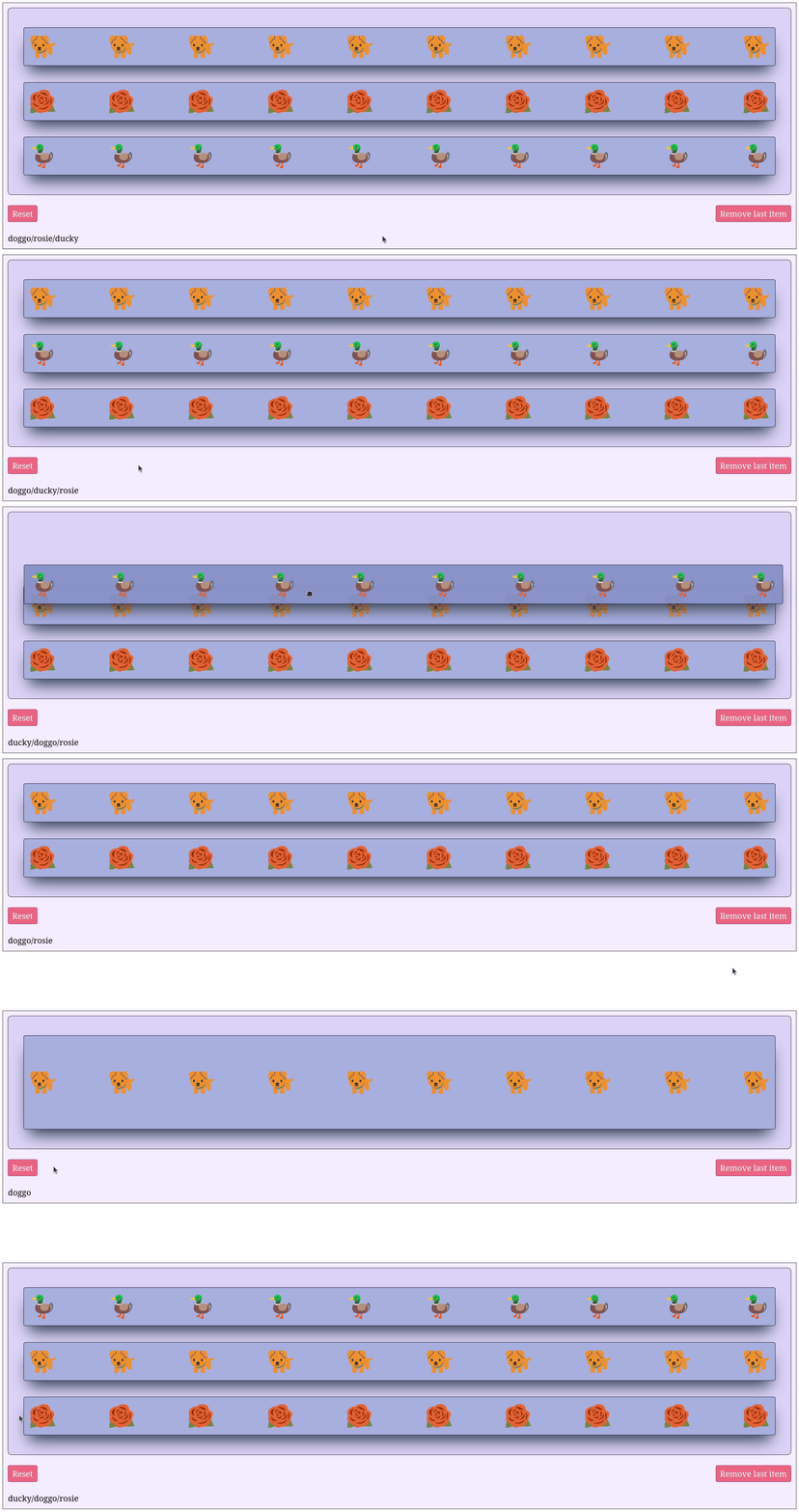
Callback re-ordering
Adding or removing the items from a SortableGroup or updating the order of the items can be done via callbacks by passing the children props as output. Thus, this requires to redraw the SortableItem children. Note that the sortedIds props is automatically updated when the children change.
Note:
Updating sortedIds in a callback will not draw again the chidren in a different order
The children props is not sorted. To get the right child in a callback based on its position, use sortedIds in combination with children (see the example below).
import dash
from   dash_iconify        import DashIconify
from   dash_sortable_items import SortableGroup, SortableItem

app = dash.Dash(__name__, assets_folder='./')

def draw_items() -> list[SortableItem]:

    item1 = SortableItem(
        id        = 'ducky',
        children  = [DashIconify(icon='noto:duck', width=50, height=50)]*10,
        className = 'item'
    )

    item2 = SortableItem(
        id        = 'doggo',
        children  = [DashIconify(icon='noto-v1:dog', width=50, height=50)]*10,
        className = 'item'
    )

    item3 = SortableItem(
        id        = 'rosie',
        children  = [DashIconify(icon='noto-v1:rose', width=50, height=50)]*10,
        className = 'item'
    )

    return [item1, item2, item3]

group = SortableGroup(
    id        = 'group',
    children  = draw_items(),
    className = 'group'
)

group_container = dash.html.Div(group, id='group-container', className='group-container')

button1 = dash.dcc.Button(
    'Reset',
    id        = 'button1',
    className = 'button'
)

button2 = dash.dcc.Button(
    'Remove last item',
    id        = 'button2',
    className = 'button'
)

button_row = dash.html.Div(
    [button1, button2],
    style = {
        'display'        : 'flex',
        'flexDirection'  : 'row',
        'justifyContent' : 'space-between'
    }
)

label = dash.html.Label('Order:', id='label')

app.layout = dash.html.Div([
        dash.html.Div(
            [group_container, button_row],
            style = {
                'display'       : 'flex',
                'flexDirection' : 'column',
                'gap'           : '20px'
        }),
        label
    ],
    className='container')

@app.callback(
    dash.Output('label', 'children'),
    dash.Input('group', 'sortedIds')
)
def _(sortedIds: list[str] | None) -> str:
    r'''Update the label every time the sortedIds props changes.'''

    if sortedIds is None: raise dash.exceptions.PreventUpdate

    return '/'.join(sortedIds)

@app.callback(
    dash.Output('group', 'children'),
    dash.Input('button1', 'n_clicks')
)
def reset(_) -> list[SortableItem]:
    r'''Reset the list when button1 is clicked.'''

    if _ is None: raise dash.exceptions.PreventUpdate

    return draw_items()

@app.callback(
    dash.Output('group', 'children', allow_duplicate=True),
    dash.Input('button2', 'n_clicks'),
    dash.State('group', 'children'),
    dash.State('group', 'sortedIds'),
    prevent_initial_call = True
)
def remove1(_, children: list[SortableItem], sortedIds: list[str]) -> list[SortableItem]:
    r'''Remove one element in the list whenever button2 is clicked.'''

    if _ is None: raise dash.exceptions.PreventUpdate

    last_id = sortedIds[-1]

    # Extract the ids of the chidlren of the group
    children_ids = [child['props']['id'] for child in children]

    # Find and remove the child with the last id in sortedId
    if last_id in children_ids:
        children.pop(children_ids.index(last_id))
    else:
        children = []

    return children

    app.run(debug=True)
.container {
    display          : flex;
    flex-direction   : column;
    background-color : #f4eeff;
    border           : 1px solid black;
    padding          : 10px;
    gap              : 20px;
}

.group-container {
    width: 100%;
}

.group {
    padding          : 30px !important;
    background-color : #dcd6f7;
    border           : 1px solid black;
}

.item {
    background-color : #a6b1e1 !important;
    box-shadow       : rgb(38, 57, 77) 0px 20px 30px -10px;
    transition       : all 0.2s ease-in-out;
    justify-content  : space-between;
}

.item:hover {
    background-color : #7e8cc5 !important;
    box-shadow       : rgb(38, 57, 77) 0px 20px 30px -10px;
    scale            : 1.01;
    transition       : all 0.2s ease-in-out;
}

.button {
    background-color: #f67280;
    color: white;
    transition       : all 0.2s ease-in-out;
}

.button:hover {
    background-color: #f67280;
    box-shadow       : #c06c84 0px 20px 30px -10px;
    color            : white;
    scale            : 1.01;
    transition       : all 0.2s ease-in-out;
}

.button:active {
    background-color: #f67280;
    color            : white;
    scale            : 0.99;
    transition       : all 0.2s ease-in-out;
}